Scope of this hardware investigation
The measurements below describe a specific Vu+ Duo 4K SE running OpenPLi 9.2 with the bcm7335/NEXUS driver and the tested physical cabling. They are historical hardware observations, not a claim that every FBC receiver exposes the same usable inputs or that all Linux DVB drivers need the same workaround. The October editorial review checked the published account against the companion configuration bundle; it did not rerun a tuner-crash test on the receiver.
In this guide
- Scope of this hardware investigation
- Adapting the result to your receiver
- The short version
- Why the original SatPI installation failed
- First: prove which tuner actually works
- The first real SatPI problem: DiSEqC on FBC children
- The two-digit frontend bug
- The NEXUS demux is not a normal Linux DVB demux
- Why pids=all cannot simply mean PID 8192
- A useful discovery: some of my own tests were wrong
- The most frustrating problem: DVBViewer found the server but still played nothing
- The practical fix: retry with AUTO tuning hints
- There was another DVBViewer problem: the wrong tuner could be selected
- SSDP discovery was a separate problem
- SIGPIPE and RTSP stability
- How I verified the final system
- Final SatPI tuner layout
- The working test request
- What this means for other Vu+ Duo 4K SE owners
- Current result
- Frequently asked questions
- Final takeaway
The Linux DMX_ADD_PID interface specifies a pointer to a 16-bit PID. Any different argument handling described below belongs to the tested proprietary-driver behaviour, not to a general replacement definition of the Linux API.
The final enabled satellite input in this deployment was frontend9, exposed as stream10. The second bank’s existence does not mean its children were all enabled and independently usable. Keep the operating configuration, FBC routing code, physical input, and advertised capability separate when adapting the account to another receiver.
An HTTP 200 response and a running daemon are preliminary checks. The useful evidence is tuner lock, real non-NULL transport packets, expected PAT/PMT and elementary PIDs, stable client playback, clean teardown, and persistence after restart. Packet counts quoted in this article are the original test observations; they are not newly collected October results.
The downloadable regression script checks the RTSP keepalive parser. It is not a PID-8192 driver test. Do not deliberately send the literal all-PIDs value to the affected driver: the original investigation observed a kernel oops. Diagnose that path from the recorded behaviour and use the patched userspace PID selection.
Adapting the result to your receiver
- Record receiver model, image, driver, SatPI build, and physical cable paths.
- Identify the root frontend and verify which application owns it before enabling more inputs.
- Test one known transponder with the correct source and lowercase polarity parameter.
- Verify real MPEG-TS content, not only response status or signal-strength output.
- Check client keepalive and disconnect handling separately from tuning and PID selection.
- Keep the known-working configuration and test restart persistence under controlled conditions.
The companion files explain the tested layout. They are starting evidence for the described receiver, not a universal drop-in configuration for unrelated hardware. Preserve your existing receiver configuration before adapting them.
Running SatPI on a Vu+ Duo 4K SE sounds like it should be straightforward. The receiver already has FBC tuners. SatPI can expose DVB tuners over the network using the SAT>IP protocol. A client such as DVBViewer can discover the receiver, tune a satellite transponder and receive an MPEG transport stream over the network. In practice, the Vu+ Duo 4K SE turned out to be a very different target from a conventional Linux DVB system. I spent a considerable amount of time debugging the actual receiver rather than trying random configuration changes. The important part of this investigation was that the failures were not all caused by SatPI itself. Some came from the Broadcombcm7335 / NEXUS driver stack, some from assumptions in the original SatPI DVB implementation, and one particularly annoying problem came from tuning parameters supplied by DVBViewer.
The final result is a working SatPI installation on a Vu+ Duo 4K SE running OpenPLi 9.2.
DVBViewer discovers the SAT>IP server, DiSEqC switching works, the correct FBC tuner is selected, DVB-S2 transponders lock, real RTP/TS data reaches the client, and Enigma2 can continue using the other tuner bank.
This article explains what actually went wrong and how I verified the fixes.
The short version
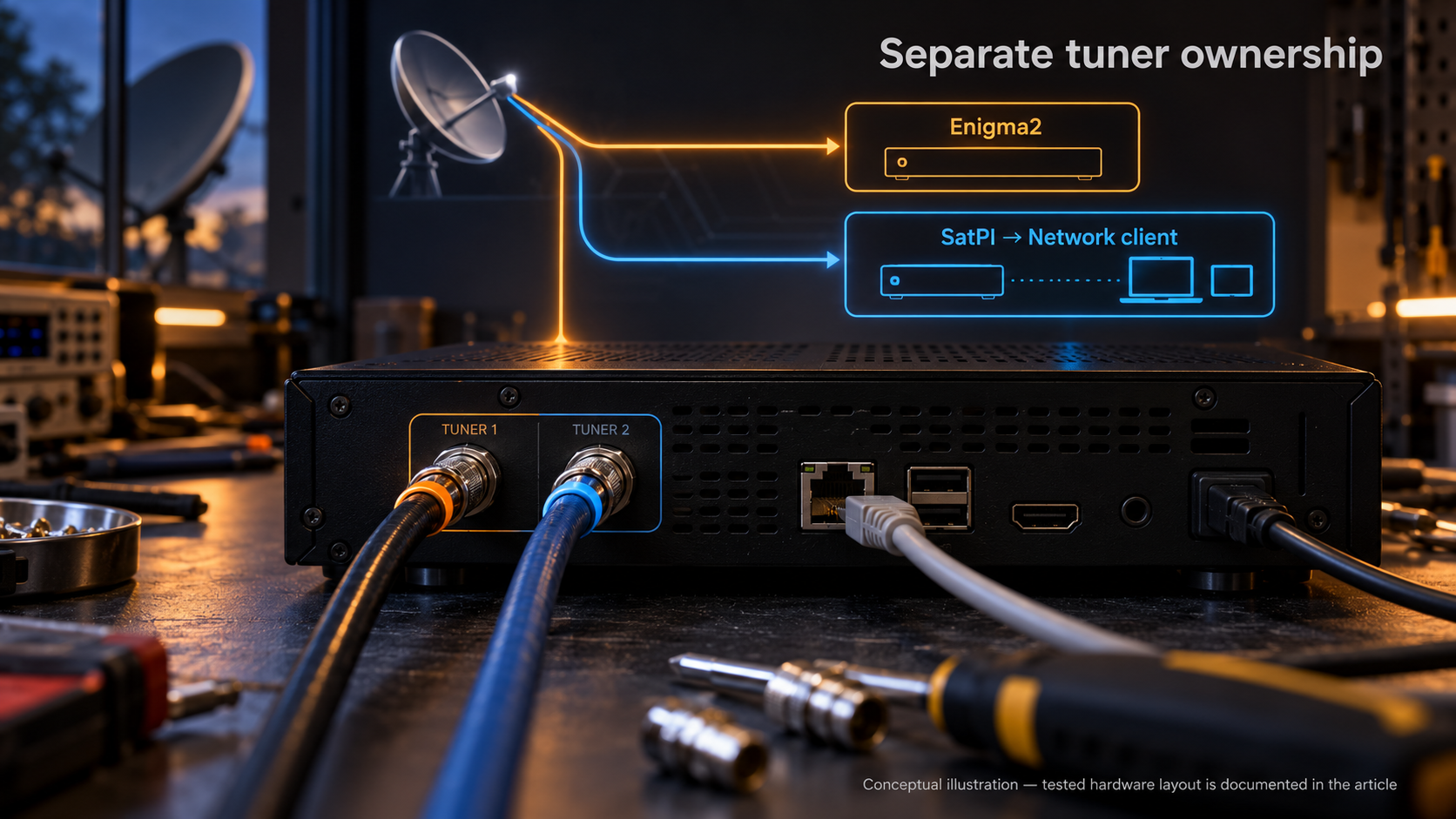
If you are looking for the answer before reading the complete investigation, this is the important part: The Vu+ Duo 4K SE should not be treated as 16 completely independent DVB frontends. The receiver exposes 16 Linux DVB frontends, but they represent two FBC banks with root and child relationships. On my installation:- Slot A belongs to Enigma2.
- Slot B is used by SatPI.
frontend9is the working SatPI root tuner.- Its FBC children cannot reliably perform DiSEqC themselves.
- DiSEqC therefore has to be routed through the root frontend.
- The NEXUS demux requires its own specific handling of
DMX_SET_SOURCE, PID filters and buffer configuration. pids=allcannot be implemented by sending PID8192to this driver because that can crash the kernel.- DVBViewer can send stale DVB-S2 tuning hints which prevent the NEXUS demodulator from locking.
- SatPI therefore needs to retry a failed tune with pilot/FEC/rolloff hints relaxed to AUTO.
- SSDP discovery also needs the correct Ethernet interface because advertising
0.0.0.0makes the server undiscoverable even when streaming itself works.
Why the original SatPI installation failed
The first useful clue was upstream SatPI issue #210, which reports that on the Vu+ Duo 4K SE only the first eight tuners work. That description was close to what I was seeing, but it did not explain the whole problem. The receiver actually exposes:/dev/dvb/adapter0/frontend0
/dev/dvb/adapter0/frontend1
...
/dev/dvb/adapter0/frontend15
| SatPI frontend | Linux frontend | Physical connection |
|---|---|---|
fe=1 |
frontend0 |
Tuner A, motor-controlled dish |
fe=2 |
frontend1 |
Tuner A, 4-port DiSEqC switch |
fe=3-8 |
frontend2-7 |
FBC children of A |
fe=9 |
frontend8 |
Tuner B, direct 23.5E input |
fe=10 |
frontend9 |
Tuner B, DiSEqC switch |
fe=11-16 |
frontend10-15 |
FBC children of frontend9 |
frontend9 was connected to the DiSEqC switch and could reach the required satellite positions. The child frontends below it could not perform the DiSEqC operation themselves.
That distinction became the foundation of the fix.
First: prove which tuner actually works
One of the easiest mistakes with FBC hardware is to enable every frontend because the operating system reports that they exist. That makes the problem worse. If SatPI advertises several frontends and the client chooses between them, DVBViewer can end up on a tuner that has:- no usable cable,
- no DiSEqC capability,
- or the wrong FBC relationship.
- 23.5E: 2044 packets
- 19.2E: 6139 packets
- 13E: 4095 packets
Enigma2
  └── Slot A
      ├── frontend0
      ├── frontend1
      └── frontend2-7

SatPI
  └── Slot B
      ├── frontend8
      └── frontend9-15
The first real SatPI problem: DiSEqC on FBC children
The original DiSEqC implementation assumed that the selected frontend file descriptor could simply be used to send the DiSEqC command. That does not work correctly with the bcm7335/NEXUS implementation. I could reproduce the failure directly: an FBC child frontend could tune in situations where the root frontend was appropriate, but attempting to send DiSEqC through the child path failed. The fix was to use the FBC root connection. Conceptually:DVBViewer
|
v
SatPI child frontend
|
| FBC relationship
v
root frontend
|
v
bcm7335 / NEXUS
|
v
DiSEqC switch
tone OFF
target voltage
master command
mini-burst
tone
The two-digit frontend bug
There was another smaller problem that was surprisingly easy to overlook. The original path manipulation used a replacement operation that worked for a one-digit frontend number but broke when the frontend number became two digits. In other words, logic that was effectively safe for:frontend8
frontend10
frontend11
...
frontend15
frontendN suffix rather than assuming a single character represented the frontend number.
This sounds trivial, but on a receiver with sixteen frontends it is exactly the kind of assumption that survives unnoticed until FBC children are actually tested.
The NEXUS demux is not a normal Linux DVB demux
This was one of the most important findings during the investigation. The bcm7335/NEXUS driver does not behave like the generic DVB demux model that SatPI originally assumed. I verified this using an ioctl tracer and standalone C tests rather than relying only on SatPI logs.DMX_SET_SOURCE must use the demux’s own file descriptor
The source has to be configured on the same demux file descriptor that owns the filters.
For example:
/dev/dvb/adapter0/demux8
8
+32 or +40.
That distinction is important because an implementation can appear logically correct while silently selecting the wrong NEXUS source.
PID filters behave differently too
Another unexpected behaviour was that simply installing a PES filter did not produce transport packets. A filter setup such as:SET_PES_FILTER
DMX_ADD_PID operations to start the demux path.
SatPI normally gets those initial PIDs naturally because clients request common PSI/SI data such as:
0
1
16
17
18
DMX_ADD_PID becomes active after a delay of several seconds, which is important when testing the system. A five-second capture can easily give the impression that a newly requested service did not work.
On this hardware I found roughly a 32-channel limit per demux file descriptor. Bursts that stayed around 10, 16 or 24 PID channels worked, while a larger burst could fail.
That limit directly influenced how pids=all had to be implemented.
Why pids=all cannot simply mean PID 8192
Many SAT>IP implementations use:
pids=all
0x2000 / 8192 value to the driver.
On this NEXUS driver, that is unsafe.
Testing it caused a kernel oops inside:
NEXUS_Recpump_AddPidChannel_impl
8192 PID to the kernel.
Instead, pids=all is emulated in userspace.
The process is roughly:
PAT
 |
 +-- discover PMT PIDs
 |
 +-- read PMTs
      |
      +-- video
      +-- audio
      +-- PCR
      +-- ECM
      +-- other required PIDs
pids=all test produced:
- 201,527 TS packets
- 26 unique PIDs
- real video PIDs including 566 and 562
- no kernel crash
- 235,886 TS packets
- 23 active PIDs
- approximately 8–12 Mbps
- real PMT/ES traffic rather than only SI packets
A useful discovery: some of my own tests were wrong
During the investigation I also found several traps in my test code. This is worth documenting because someone debugging the same hardware can otherwise waste hours blaming SatPI.SEC_TONE_ON is zero
I initially treated the enum as if SEC_TONE_ON had value 1.
It doesn’t.
On this API:
SEC_TONE_ON = 0
DMX_ADD_PID expects an int
Another test initially passed an unsigned short.
The driver reads four bytes, so the result was garbage PID data, including values such as:
2621441
int.
DVB-S2 needs the complete property set
The tuner also needs a proper DVB-S2 property set. The successful tests included:DELIVERY_SYSTEM = SYS_DVBS2
MODULATION = 8PSK / QPSK
FEC = AUTO
INVERSION = AUTO
ROLLOFF = AUTO
PILOT = AUTO
0x07 while delivering no useful TS.
For this receiver:
0x07 = no lock
0x1f = full lock
The most frustrating problem: DVBViewer found the server but still played nothing
This was the point where the system became especially deceptive. Eventually DVBViewer could discover the SatPI server. The server was visible. The client could start a session. But the channel still would not play. The tuner remained at:status = 0x07
SETUP ?src=1&freq=11856&msys=dvbs2&plts=off&fec=34&pol=v&ro=0.20&sr=29900&mtype=8psk
plts=off
fec=34
plts=off + explicit FEC
The practical fix: retry with AUTO tuning hints
The solution was not to modify the DVBViewer channel list and hope every future client has correct parameters. The more robust solution is inside SatPI. When an explicit tuning request fails to lock, the patchedFrontend::setupAndTune() checks whether the request contains explicit pilot, FEC or rolloff hints.
If the first lock attempt times out, SatPI retries with those hints relaxed to AUTO.
Conceptually:
Client request
     |
     v
Tune using supplied parameters
     |
     +---- LOCK ----> stream
     |
     +---- timeout
              |
              v
       relax pilot/FEC/rolloff
              |
              v
          retune
              |
              v
            LOCK
0x1f
There was another DVBViewer problem: the wrong tuner could be selected
Even after fixing the tuning hints, DVBViewer could still land on the wrong frontend if too many SatPI streams were advertised. The problematic pool included:stream9 -> frontend8
stream11-16 -> FBC children
frontend8 was a dead cable path in this particular installation.
The FBC children could not perform the required DiSEqC operation.
So DVBViewer could appear to work randomly depending on which tuner SatPI assigned to the session.
The solution was deliberately restrictive.
Only the known-good DiSEqC-capable root stream is advertised for normal DVBViewer use.
In the final configuration:
stream10 -> frontend9
SSDP discovery was a separate problem
Another interesting failure happened after the actual streaming path was already working. DVBViewer could stream from SatPI if given the server manually, but its automatic SAT>IP discovery found nothing. The reason was visible in the SSDP response. SatPI was advertising:LOCATION: http://0.0.0.0:8875/desc.xml
--iface-name eth0
LOCATION: http://<receiver-lan-ip>:8875/desc.xml
SIGPIPE and RTSP stability
There were also two stability issues that had to be fixed before long-running testing became useful. The first wasSIGPIPE.
If a SAT>IP client closed its TCP connection while SatPI was still writing stream data, the process could receive:
Broken pipe
SIGPIPE in main.cpp:
signal(SIGPIPE, SIG_IGN);
OPTIONS keepalive every 30 seconds.
With that in place, an RTSP feed was verified for approximately 52 minutes, with:
- 122k RTP packets
- 669k TS packets
- clean TEARDOWN
How I verified the final system
I deliberately did not consider the SatPI work finished simply because:SatPI was running
DVBViewer discovered the server
0x1f
0x1FFF
- 23.5E
- 13E
- 19.2E
- SatPI autostarted,
- port
554was available, - port
8875was available, - Enigma2 was still running,
- the tuner split was preserved,
pids=allstill produced real transport data.
Final SatPI tuner layout
The final setup intentionally separates Enigma2 and SatPI.Vu+ Duo 4K SE
|
+-- FBC Slot A
| |-- frontend0
| |-- frontend1
| +-- frontend2-7
|
| +-- Enigma2
|
+-- FBC Slot B
|-- frontend8
|-- frontend9 <- SatPI root / DiSEqC switch
+-- frontend10-15
The working test request
For a direct HTTP test on the receiver, the working form is:curl -s --max-time 60 'http://<receiver-ip>:8875/?freq=11739&pol=v&sr=29900&msys=dvbs2&fe=9&pids=all' -o /tmp/sp.tspol=v
pol=V
- HTTP returned
200 OK - SatPI appeared to accept the request
- the client received data
- but the transport stream consisted of NULL packets
What this means for other Vu+ Duo 4K SE owners
The biggest lesson from this project is that the Vu+ Duo 4K SE is not simply a normal Linux DVB machine with sixteen interchangeable/dev/dvb frontends.
The FBC architecture and the bcm7335/NEXUS driver matter.
If you are troubleshooting SatPI on this receiver, I would check the following in this order:
1. Identify the physical frontend
Do not start by enabling everything.
Find which physical LNB input actually receives the satellite signal you need.
2. Test DiSEqC independently
Verify the root frontend can switch between the required satellite positions.
3. Do not send DiSEqC through an FBC child
Route the operation through the root frontend.
4. Verify the NEXUS demux
Make sure DMX_SET_SOURCE is applied to the correct demux fd and uses the frontend index expected by the driver.
5. Watch PID limits
Do not blindly create thousands of kernel PID filters.
6. Never send literal PID 8192 for pids=all
On this driver that can cause a kernel oops.
7. Check polarity case
Use:
pol=v
pol=V
plts
fec
ro
0x1f, retrying with AUTO values can be the difference between a dead stream and a working one.
9. Advertise only usable SAT>IP tuners
A client choosing randomly among broken FBC children is not useful.
10. Test after reboot
The final test should include actual TS packets after a clean boot.
Current result
The patched SatPI installation now provides the behaviour I originally expected from the Vu+ Duo 4K SE:- DVBViewer discovers the SAT>IP server.
- The correct FBC root frontend is selected.
- DiSEqC switches between the required satellite positions.
- DVB-S2 transponders reach full lock.
- Real MPEG-TS data reaches the client.
pids=allworks without sending the dangerous8192PID to the kernel.- Enigma2 continues running on its own tuner bank.
- SatPI survives reboot and starts automatically.
- The installation works with the bcm7335/NEXUS driver stack used by this receiver.
DVBViewer
   |
   | SAT>IP / RTSP
   v
SatPI
   |
   |-- stale DVB-S2 hints
   |-- FBC child/root handling
   |-- DiSEqC routing
   |-- PID management
   +-- RTSP/SSDP stability
   |
   v
Linux DVB API
   |
   v
bcm7335 / NEXUS
   |
   |-- unusual demux behaviour
   |-- FBC relationships
   +-- DiSEqC limitations
   |
   v
LNB / DiSEqC switch / satellite
Frequently asked questions
Does SatPI work on the Vu+ Duo 4K SE? Yes, with the required changes for the bcm7335/NEXUS FBC implementation. The important part is not to expose every Linux frontend as an independent SAT>IP tuner. The working configuration uses the correct FBC root and routes DiSEqC through it. Why does DVBViewer discover SatPI but show no picture? There are several possible causes. The two most important ones found during this investigation were: DVBViewer selected an unusable FBC/dead frontend. DVBViewer supplied stale DVB-S2 hints such asplts=off together with an explicit FEC.
The patched SatPI configuration restricts the tuner pool and retries failed tunes with pilot/FEC/rolloff set to AUTO.
Why does SatPI return data but DVBViewer still shows no signal?
Check whether the data is real TS data.
An HTTP 200 OK does not prove that the tuner locked.
Also check the polarity parameter. On this setup:
pol=v
pol=V
pids=all be passed directly to the NEXUS driver?
No.
Sending PID 8192 caused a kernel oops during testing.
The safe implementation emulates pids=all in userspace by discovering the relevant PSI/PMT/ES/PCR/ECM PIDs and adding them individually.
Can Enigma2 and SatPI run at the same time?
Yes.
The working configuration splits the tuner banks so that Enigma2 owns one side and SatPI owns the other.
The important rule is that the same frontend should not be opened by both applications.
Does it survive reboot?
Yes.
The final installation was reboot-tested. SatPI autostarts, the tuner split remains intact, and real pids=all transport data was verified after boot.
Does this require OpenATV or VTi?
No.
The tested installation is OpenPLi 9.2. The patched SatPI binary is statically linked so it does not depend on the newer host glibc/libstdc++ versions used by the build toolchain.
What should I check first if I reproduce the problem?
Start with these three things:
- Is the correct physical FBC root selected?
- Does the frontend reach 0x1f?
- Is DVBViewer sending stale plts/fec/rolloff values?
Final takeaway
The original problem looked like “SatPI only uses eight tuners on the Vu+ Duo 4K SE”. After actually tracing the DVB calls and testing the hardware, that description turned out to be incomplete. The real problem was the interaction between FBC root/child frontends, DiSEqC, the bcm7335/NEXUS demux, SAT>IP PID handling and DVB-S2 tuning hints coming from the client. That is why simply changingSatPI.xml was never going to be enough.
The useful fix came from testing each layer against real hardware and keeping the measurements — lock status, packet counts, PIDs, DiSEqC behaviour and reboot persistence — rather than treating “the process is running” as proof that SAT>IP works.
And that is also why this setup is now much easier to troubleshoot: when something fails, there is a concrete measurement to look at instead of another round of blind configuration changes.