If you’ve lost money to an unexpected gas spike on Uniswap or had a transaction stall in the mempool, you already understand the problem. Ethereum gas fees are not stable. They move block by block, and a fee that looks fine when you click confirm can be 3× higher by the time the transaction lands — or your transaction gets skipped entirely because someone else paid more.
This guide walks through every section of the ETH Gas Live Tracker — a free Ethereum gas tracker that runs in real time. Every number on the dashboard refreshes every ~12 seconds as new blocks arrive: live fees across three tiers, a price history chart, a 7-day heatmap showing cheapest hours, USD cost breakdowns per transaction type, a fee calculator, timing recommendations, and browser alerts. If you’re looking for an Ethereum gas tracker in 2026 that gives you something to actually act on, here is what each section shows and when it matters.
Live tool: logicencoder.com/ethereum-gas-tracker
Why Ethereum Gas Fees Are So Hard to Predict
Under Ethereum’s EIP-1559 fee model, every block has a base fee that adjusts automatically based on how full the previous block was. Add a priority tip on top to signal to validators that you want faster inclusion. Both numbers change every ~12 seconds. A base fee of 0.08 GWEI can reach 0.80 GWEI within a single hour during a popular NFT mint or a DeFi liquidation cascade — a 10× swing with no warning.
The practical result: people either overpay because they have no reference for what “normal” looks like right now, or they set fees too low and their transaction stalls. Both problems have the same fix — look at a live tracker before you transact, not after.
Network Statistics — Read the Network Before You Read the Price
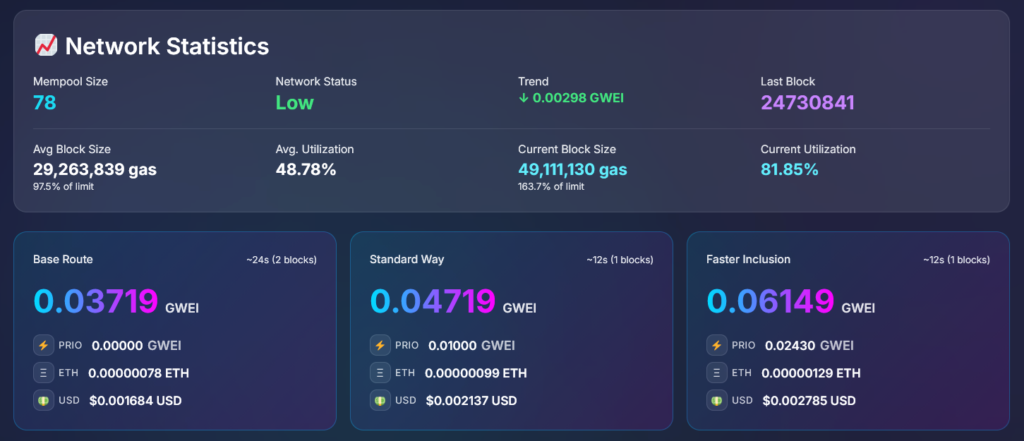
The top panel updates on every new block. The most useful values here are not the gas price itself — they are the signals that tell you where gas is going:
- Mempool size — transactions waiting to be included. A mempool of 14 is quiet. A mempool of 300+ means backlog is building and fees will rise in the next few blocks.
- Network status — Low / Moderate / High / Very High. Plain-language summary so you don’t have to interpret every metric individually.
- Current trend — whether the base fee moved up or down in the last block, shown as a GWEI delta with a directional arrow. A falling trend with a small mempool is often the window to send a non-urgent transaction.
- Block utilization — percentage of block capacity currently being used. This is the earliest available warning signal: when blocks fill above 100% of the target consistently, Ethereum’s protocol automatically raises the base fee next block. One full block is not a trend; sustained >100% utilization is.
Live Gas Price Tiers — Three Options for Three Situations
Most gas tools give you one number. That one number does not map cleanly to every situation — a cold storage transfer and a competitive NFT mint have completely different tolerance for waiting. The tracker splits live Ethereum gas fees into three tiers:
- Base Route — minimum viable fee. Near-zero priority tip on top of the base fee. Validators will include this eventually, but you might wait several blocks. Use it for anything where timing genuinely does not matter.
- Standard Way — the default for most transactions. A modest priority tip that targets inclusion within one to two blocks under normal network conditions. Where most people should be most of the time for ETH transfers, token approvals, and routine DeFi actions.
- Faster Inclusion — a competitive priority tip. Use this when being one block earlier has real consequences: a DEX swap where price impact matters, an NFT mint with limited supply, or any action competing with many other users simultaneously.
Each tier shows the total GWEI, the priority fee component separately, the ETH equivalent, and the USD cost at the live ETH price. The priority fee line matters: it tells you how much of what you’re paying is the mandatory base fee versus how much is the tip you’re voluntarily adding to compete for block space. During low-congestion periods the Base Route priority tip is effectively zero — you’re paying only the base fee.
Gas Price History Chart — Is Right Now Cheap or Expensive?
The current reading tells you the price right now. The chart tells you whether that price is low, normal, or high relative to recent hours — which is what you need to decide whether to transact now or wait.
The chart plots all three tiers alongside average block utilization on a second axis. The utilization line is worth watching specifically: it tends to rise a few blocks before the base fee follows. If utilization spikes while fees are still low, fees are about to catch up.
Time range options: 1 h, 3 h, 6 h, 12 h, 24 h, 3 days, 7 days — switch without reloading. Smoothing options: Raw, EMA 5, Median 5, Clamp 99%. The Clamp 99% option is useful for longer time ranges where a single anomalous block can visually compress the entire rest of the chart — clamping removes those outliers so the normal range is readable.
Below the chart: Faster Inclusion Percentiles (FIP) — P50, P70, P75, P80, P85. These show what tip level was competitive at each percentile of included transactions. P80 means your transaction would have been included faster than 80% of confirmed transactions at that tip. During congestion, checking P75–P80 is more reliable than guessing a tip from the current Faster Inclusion GWEI alone.
Gas Heatmap — Which Hour of the Day Is Consistently Cheapest
The heatmap shows the average Standard Way gas price for every hour of every day, colour-coded from blue (low) to orange-red (high). Hover any cell to see the exact GWEI average for that hour. This answers a question most people never think to ask: is there a pattern to when gas is cheap, and can I plan around it?
Time range options: 1 h, 3 h, 6 h, 12 h, 24 h, 3 days, 7 days. At the 30-day time range the heatmap expands to the full 30-day window — useful for checking whether the patterns you’re seeing in the 7-day view hold consistently over a longer period or were a feature of one unusual week.
One detail that makes this heatmap more reliable than most: all times are shown in your browser’s local timezone. Data is stored in UTC internally, but the frontend converts it fully — including day boundaries — so midnight on the heatmap is your local midnight. Tools that display UTC heatmaps are effectively useless for planning if you’re in UTC+3 or higher, because the “cheap” hours show up on the wrong part of the grid relative to when you’re awake.
Common Transaction Costs — USD Costs for the Actions You Actually Do
GWEI values are abstract. The transaction costs panel converts live gas prices into USD for the operations people do most often on Ethereum, using the live ETH/USD price updated in real time:
- ETH Transfer (21,000 gas) — the simplest and cheapest transaction type. At peak congestion this same transfer can cost $0.50–$2.00+.
- Token Transfer (65,000 gas) — sending USDC, LINK, or any ERC-20 token. Costs approximately 3× an ETH transfer because of the additional contract execution involved.
- DEX Swap (180,000 gas) — a standard Uniswap or Curve swap. At high congestion the same swap regularly reaches $1–$5, which matters significantly if you’re swapping a small position.
- Token Approve (46,000 gas) — the approval transaction required before most DeFi protocols can access your tokens. Easy to overlook — it’s a separate fee on top of the actual swap or deposit, and it happens every time you interact with a new contract.
Fee Calculator — Enter Any Gas Limit, Get the USD Cost Immediately
For transactions not covered by the presets — Aave borrows, staking deposits, NFT mints, custom contract calls — enter any gas limit directly. The calculator shows the USD cost for each tier instantly, using the live ETH price. Select a preset transaction type to auto-fill its typical gas limit, or type a custom value. Switch between Base Route, Standard Way, Faster Inclusion, or enter a custom GWEI to test a specific number.
The calculator sits in the right column alongside the chart. It uses the same live ETH/USD price feed as the transaction costs panel — so if you’re looking at a chart spike from three hours ago and wondering what that same swap would cost right now, the calculator answers that in one step.
Gas Intelligence Hub — Should You Send Now or Wait?
The Intelligence Hub sits in the right column below the fee calculator. It pulls together timing data, a live send recommendation, and network health into one panel. All of it updates in real time.
Smart Timing Insights
Based on the last 24 hours of block data, the tracker calculates which hour had the lowest average gas (best time to send) and which had the highest (worst time to avoid). The screenshot shows: best time 07:00 UTC averaging 0.054025 GWEI, worst time 04:00 UTC averaging 0.468268 GWEI — nearly a 9× difference within the same 24-hour window. This spread is typical: Ethereum gas has strong time-of-day patterns tied to when US and European markets are most active. Knowing where you are in that cycle before transacting is genuinely useful, especially for non-urgent actions.
Send Recommendation
A one-line verdict: currently showing “Wait — gas is 28% above average. Rather wait for drop.” It shows the current GWEI in both GWEI and USD, the 24-hour average in both GWEI and USD, and the trend delta so you can see which direction things are moving. The USD figures are useful here — seeing “current $0.004438 vs average $0.003481” is more immediately meaningful than comparing raw GWEI numbers for most people.
Network Health Score
A composite 0–100 score combining block utilization and current fee pressure into a single number. Currently 30/100: “Moderate activity — Standard Way gas usually fine.” Faster to read than checking utilization and mempool size separately when you just want a quick go/no-go signal.
Gas Alerts — Get Notified When Fees Hit Your Target
Set a GWEI threshold, choose whether to alert when gas goes over or under that value, and the tracker fires a native browser notification when the condition is met. Useful when you have a transaction to make but the current gas price is higher than you want to pay — set the alert and walk away from the screen.
Example: Standard Way is at 0.35 GWEI and you want to do a Uniswap swap when it drops to 0.10 GWEI. Set the threshold to 0.10 GWEI, choose “alert when gas goes UNDER threshold”, switch to another tab, come back when the browser notification fires. No account needed. Email alerts are in development.
Advanced Statistics — What the Last 24 Hours Actually Tell You
The Advanced Statistics panel covers the rolling 24-hour window — not midnight-to-now, but always a full 24 hours regardless of when you open it. The Overview tab shows current, min, max, average, and median per tier. The numbers worth paying attention to:
- Max values — Faster Inclusion hit 0.733045 GWEI at some point in the last 24 hours. The current reading is 0.135894 GWEI. That gap tells you there was a significant congestion event that has since passed — and that transacting during that spike would have cost you 5× what it costs right now.
- Median vs average — if median is significantly lower than average, the average is being pulled up by spikes. Most of the time fees were lower than the average suggests. A large gap between the two means the network had at least one major outlier event in the window.
- Min values — Base Route dropped to 0.028524 GWEI at its cheapest in the last 24 hours. That is the floor the network reached. If you have a flexible non-urgent transaction, conditions near the min are achievable based on this window — they happened within the last day.
The Detailed tab adds standard deviation per tier and a mempool snapshot. The Time Analysis tab gives a chronological hourly breakdown of the full 24-hour window — useful if you want to see the sequence of events rather than just the aggregate numbers.
Mobile Responsive
The full dashboard works on mobile. All sections — chart, heatmap, transaction costs, calculator, intelligence hub, alerts, statistics — reflow to a single column. No features are removed or hidden. If you’re about to confirm a transaction on your phone, the same data is available.
Open the Tracker
Free to use, no account required. Open it before any transaction on Ethereum — a Uniswap swap, an Aave deposit, a token transfer, an NFT mint. Checking gas for 30 seconds before confirming is the most direct way to avoid overpaying on Ethereum transaction fees in 2026.
→ logicencoder.com/ethereum-gas-tracker
Leave a Reply